I met him because someone thought I ought to. That was the reason given, anyway. I was visiting Yosemite about twenty years ago, staying long enough to fall into conversation with a park employee who, after a day or two of small talk, said, almost casually, “You should meet a friend of mine.” He paused, gauging whether I was the sort of person who might laugh. “He lives off the grid. Completely.”
We drove for a while after leaving the park boundary. That mattered, I was told. Inside Yosemite, the rules were absolute, and rightly so. Preservation there was not a slogan but a discipline. You could admire nature, walk through it, photograph it, but you could not negotiate with it. My host’s friend had no quarrel with that. He simply knew the difference between stewardship and suffocation.
His land lay on the side of a mountain, far enough from the road that the last stretch was done slowly, deliberately, as if the place resisted being arrived at too quickly. He was a hunter, a fisherman, a farmer, but not in the romanticised way of catalogues and television. He knew where bears crossed and gave them room. He knew which rocks warmed snakes in the afternoon and left them alone. The wild boar were another matter—hybrids, aggressive, clever—and he spoke of them with the wary respect you reserve for something that can beat you if it chooses. Wolves, he said, were fewer every year. Farmers still poisoned and trapped them, not out of cruelty so much as habit. That observation came without anger, only with the calm note-taking of a man who preferred facts to outrage.
He kept a horse and goats, grazing them on land that had been measured and remeasured, not by surveyors this time but by weather, yield, and patience. Everything he needed was there, and almost nothing he didn’t.
His name was Patrick Murphy, though no one called him that. He had been christened “Lucky the Lacky” on an oil rig in his youth, a name that had clung because it was earned. Fresh out of college, qualifications in hand, his father had sent him offshore with a blunt instruction: to become an engineer, he had to start where engineering was least glamorous. That meant a year living and working with men who took pride in muscle, routine, and relentless teasing. They called him Lacky at first, and the name was not kind. He carried tools, cleaned messes, learned the rhythms of machinery and people. The teasing persisted, but so did the respect. Friendship grew where condescension was expected.
The day the name changed, a pressure system failed. A safety valve did its job too well. Shrapnel tore through the air, punched through a hut, and vanished into the sea beyond. Patrick had just sat down inside. Had he still been standing, he would not have walked away. The men who saw it happen decided that Lacky no longer fit. From then on he was Lucky, though “Lucky the Lacky” remained his formal title whenever ceremony demanded it.
He went on to live what most people would call a successful life. Marriage, children, good money, a future inheritance. Then came the divorce. It did not ruin him, but it rearranged him. He began to notice how much of his life was spent maintaining things he did not particularly want, under rules that assumed he could not be trusted to manage himself. The problem, as he saw it, was not rules in themselves. He had lived with them on rigs and respected them there. The problem was excess—regulation without purpose, oversight without understanding.
So he bought a mountain.
By forty, he had stripped his life back to what he considered essential. He obeyed the laws that mattered—licenses, taxes, insurance—and did so meticulously. A former engineer with an almost pathological respect for tolerances, he designed everything to exceed requirements. If an inspector came, they left reassured, if slightly puzzled. Beyond that, he kept authority at arm’s length.
Power came first from the sun. Solar panels fed an array of ten forty-eight-volt lead-acid batteries, the best available at the time. That power pumped water into a tower-mounted tank, gravity doing the rest. When he opened a tap, the descending water turned a small generator, reclaiming a fraction of the energy used to lift it. “It’s not much,” he said, almost apologetically, “but it offends me to waste effort.”
A river ran through his property. On it he built a water wheel, properly licensed, inspected, and documented. It produced about thirty amps at one hundred and fifteen volts, day and night. That, he said, was the only part of his life that required anyone else’s permission, and he accepted that without complaint. Left unregulated, rivers were abused. Some rules, he believed, existed because people had earned them.
He was not, despite appearances, cut off. He had internet access. He wrote, studied, made videos. An address existed where parcels could find him. He used these connections sparingly, but effectively. People sent him tools and gadgets to review. He obliged, not as an influencer but as an engineer who enjoyed explaining why something worked—or didn’t.
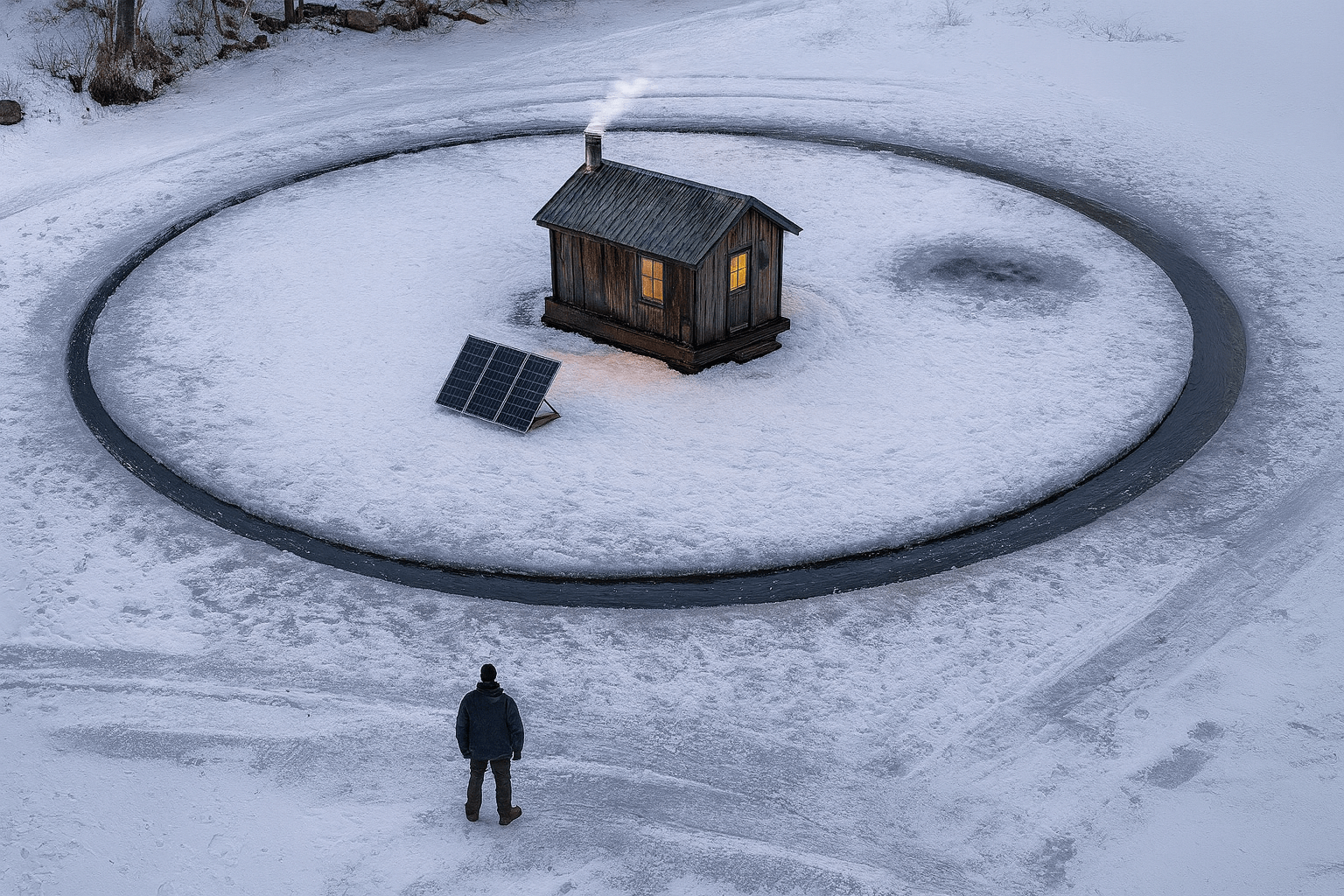
I visited him in winter, the year after he finished building his reservoir. It was fully permitted, fully documented, and entirely his own work. We walked down to it together. The lake had frozen nearly a foot thick. Near the centre, he had created an island.
He explained it with the quiet pride of someone who knew the explanation would land eventually. He had anchored a rope at the centre, drawn a perfect circle, and cut it by hand with a massive steel saw. Sixty feet across. In the middle sat an ice-fishing hut he had built himself. Double-glazed windows. A lamp. An electric cooker. Power came through a cable beneath the ice, fitted with a mechanism that allowed endless rotation without twisting. The island turned slowly during the day, driven by a small solar motor at its edge.
“Of course,” he said, watching it move, “it doesn’t run at night, or when the weather’s foul. But who wants to be out here then?”
Standing there, in the cold, watching an island turn because someone had thought carefully enough and been left alone long enough to make it happen, I felt something unexpected. Not awe at nature—I had plenty of that—but recognition. A sense that civilisation was not concrete and paperwork, not forms and permissions, but competence applied with restraint. Rules that protect, not smother. Freedom that assumes responsibility, not its absence.
When I left his mountain, I drove back towards towns and signs and instructions. I remember thinking, quite seriously, that I had just visited civilisation for the first time.




 Verbal Alchemy